


Follow these 4 straightforward steps for secure, accurate connections-paired with visual guidance to avoid common errors:
Step 1: Prep the Patient & Equipment
First, ensure reliable signal contact and device readiness:
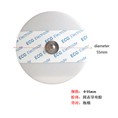
Skin Prep: Clean the electrode sites with 75% ethanol; shave hair if needed, and gently abrade the stratum corneum (with a skin prep pad) to improve conductivity . Dry the skin completely to prevent signal interference.
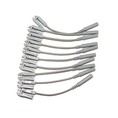
Check Gear: Confirm the ECG cable with leadwires is undamaged (no frayed wires or bent pins) and electrodes are within their expiry date .

Step 2: Connect Leadwires to Electrodes
Match leadwires to electrodes before attaching to the patient (avoids repositioning struggles):
Most cables follow AHA/IEC color codes (e.g., 5-lead setup: White=RA, Black=LA, Red=LL, Green=RL, Brown=V) .
Snap or clip each leadwire onto its corresponding electrode (ensure a tight fit-loose connections cause "leads off" alarms ).
Step 3: Attach Electrodes to the Patient
Place electrodes on standard landmarks for accurate ECG tracing:
Limb Leads: RA (right shoulder below clavicle), LA (left shoulder below clavicle), RL (right hip), LL (left hip) .
Chest Lead (V): For 5-lead cables, place the brown lead at the 4th–5th intercostal space (per monitor guidelines) .
Press firmly around each electrode's edge (not the center) to seal adhesion .
Step 4: Connect Cable to the Patient Monitor
Secure the cable to the monitor for stable data transmission:
Locate the monitor's dedicated "ECG" port (marked with a heart/lead icon). Align the connector's notch with the port's key (prevents misalignment damage) .
Push the connector until it clicks-never pull the cable to disconnect later (grip the connector instead) .
Verify the monitor recognizes the cable: A "Lead Connected" prompt or scrolling ECG waveform confirms success .
Pro Tip for Troubleshooting
If no waveform appears: Check for loose connections, re-prep skin if electrodes lift, or switch the monitor's lead setting (3-lead vs. 5-lead) to match your cable . Keep the cable away from electrosurgical tools to avoid interference .